
One place for the workday. An AI team to run it with you.
Tasks and projects, goals and OKRs, chat and feed, meetings and notes, workflows — in one workspace. Lucy and your AI employees propose the work each morning and get it done once you approve.
Free plan, no credit card · Web, iOS and Android
 Northwind Co.
Send the revised quote to Dana
Write the pricing page FAQ
Book the design review
New homepage copy
QA checklist for launch
Pick the hosting plan
Sitemap signed off
- Send the revised quoteAli · Thu
- Update the homepage copyMia · Fri
- Email Dana the next stepsYou
Teams that run on PeerBie include
DDI TechnologyBüyükçekmece MunicipalityEzine MESEM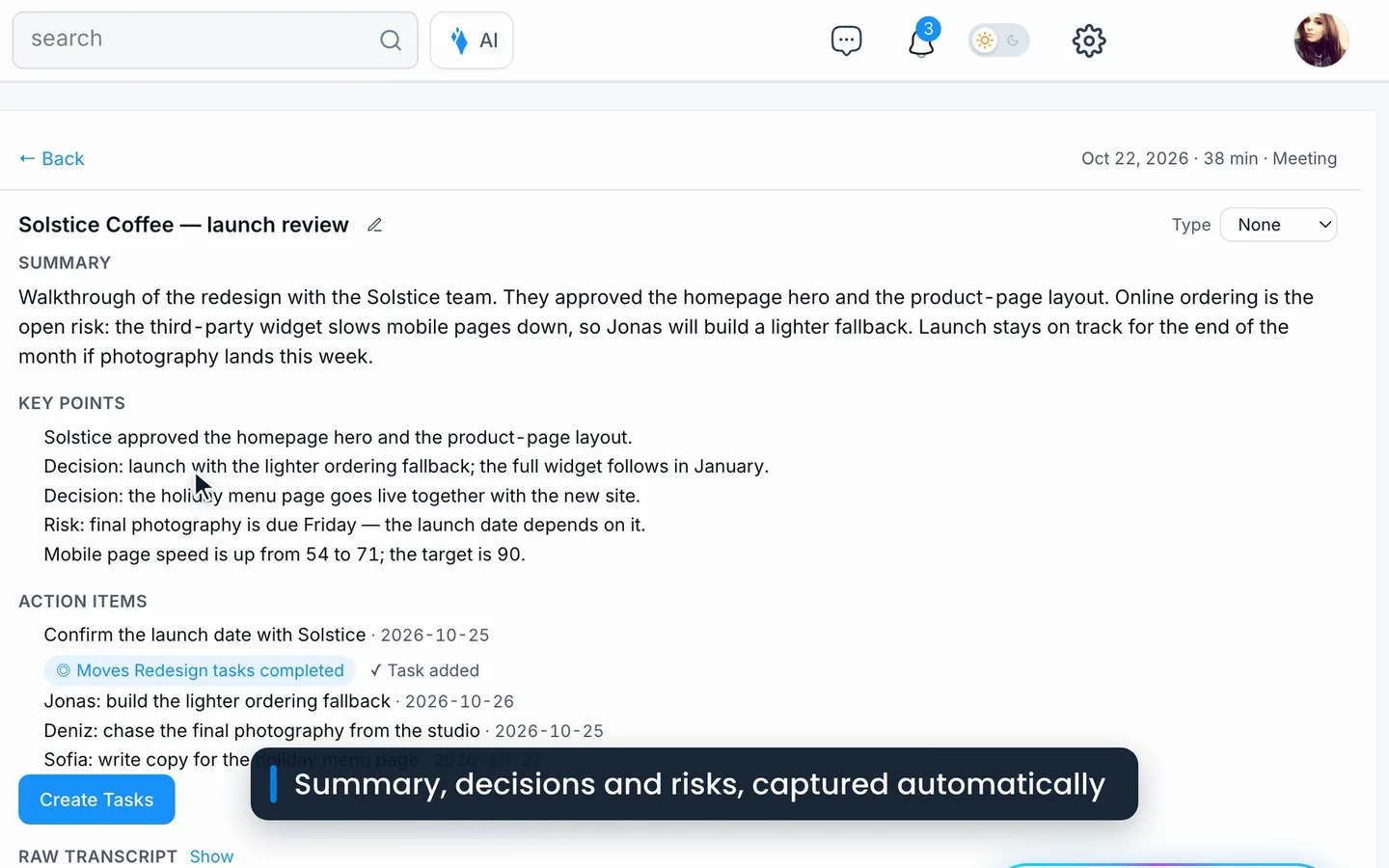
Stop stitching five tools together.
The work, the talk about the work, and the reasons behind it — in one workspace your whole team actually opens.
Plan it, assign it, see it move.
List, board, calendar and Gantt views. Recurring tasks, milestones, project dashboards and timesheets.
Projects & tasksGoals everyone can see.
Company to personal, with key results that update themselves.
Where the team talks.
Chat, direct messages and a company feed with posts, polls, events and video.
Where’s the final logo file?
In Collections › Brand › logo-final.svg
Every call becomes work.
Lucy takes notes in Zoom, Google Meet and Teams calls.
Processes that run themselves.
Forms, stages and approvals — started by an email, a schedule or an event.
Goals everyone can see. Progress nobody has to chase.
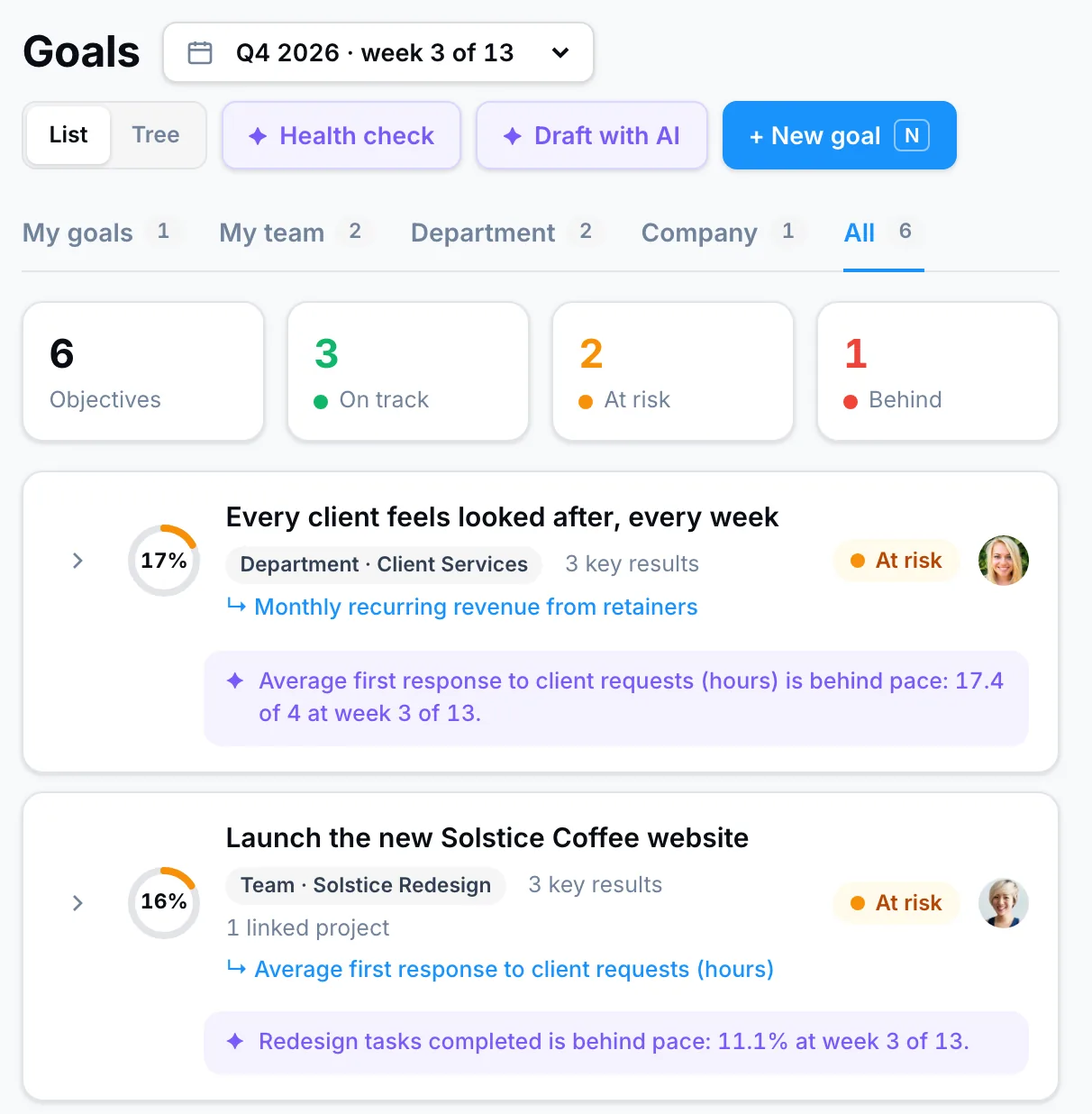
Company, department, team and personal goals with measurable key results — kept current by your projects, your workflows and your tools.
- Drafted from one sentence. Lucy writes the goal and key results with you.
- Numbers that update themselves from HubSpot, Stripe, Salesforce, Google Sheets, Excel, Jira, Pipedrive or Linear.
- Pace with a reason — on track, at risk or behind — and a close-out at the end of every quarter.
Leave the meeting. The follow-up is already done.
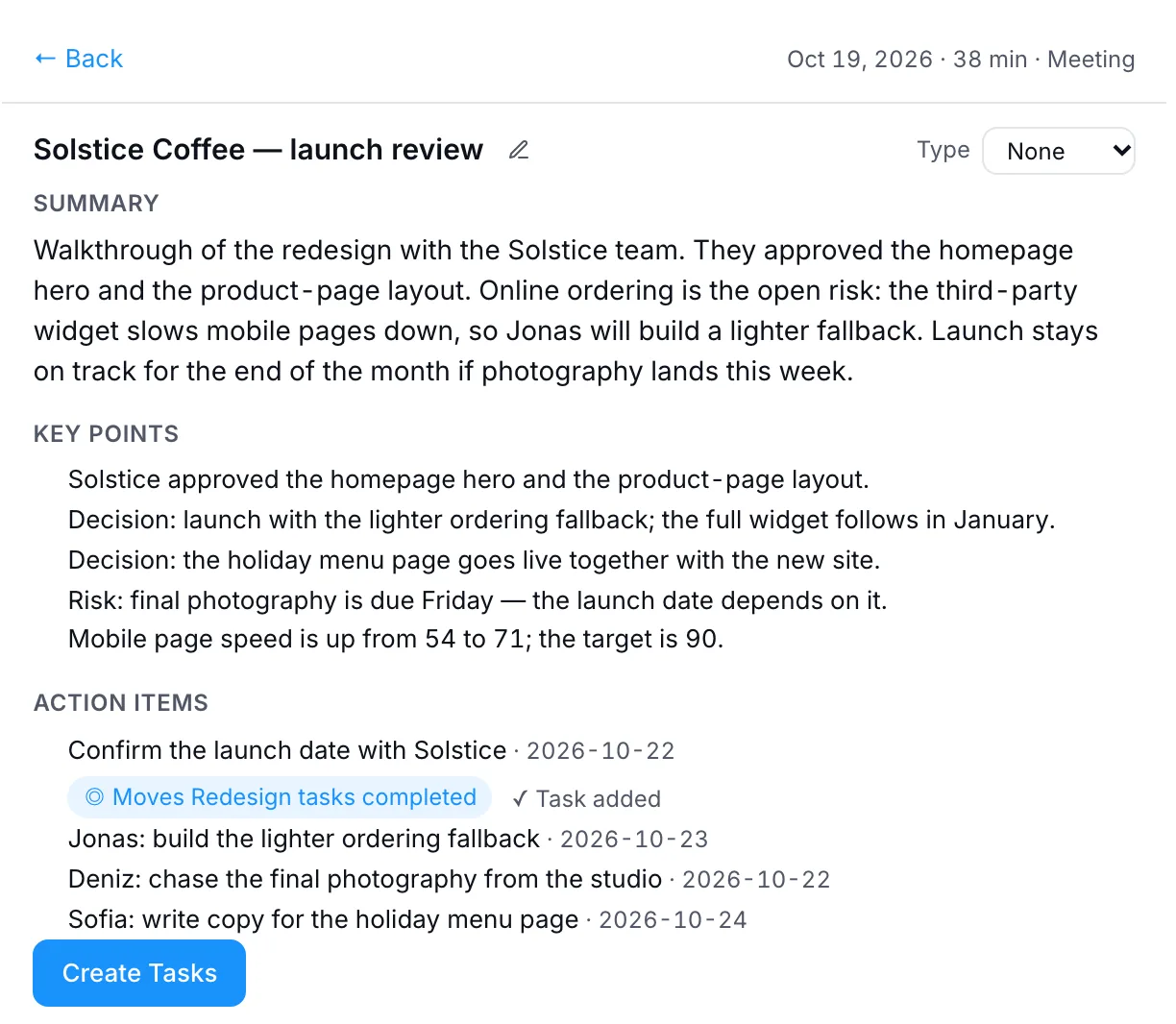
Schedule Zoom, Google Meet or Teams calls from PeerBie or just by asking Lucy. Her note-taker joins the meetings on your calendar, writes the notes and turns action items into tasks with owners and dates.
- A silent note-taker in Zoom, Google Meet and Microsoft Teams.
- Decisions and action items filed on the Notes & meetings page, ready to become tasks.
- Huddles — drop-in audio rooms with screen share, where Lucy and your AI employees join by voice.
Describe the process. PeerBie runs it.
Build no-code workflows with forms, stages and approvals — or tell Lucy what you need and she lays it out. AI employees can own a stage. And a workflow can now start by itself.
…and test it safely before it goes live. See Test run →
Explore workflowsConnected to the tools you already use.
30+ integrations where Lucy and your AI employees take real actions — send, schedule, create, update — not just read.
Names and marks belong to their owners. All integrations
Use PeerBie inside Claude and ChatGPT.
Ask about your tasks, goals and projects from the AI assistant you already use — and update them from there. Listed in Claude’s connector directory; in ChatGPT through developer mode.
Teams run on PeerBie.
“PeerBie brought order and clarity to our development process and aligned our teams to deliver on time — letting me focus on the big picture.”
“Thanks to PeerBie’s AI, I no longer spend hours wrestling with project details and follow-ups.”
“With PeerBie we didn’t just optimize our marketing processes — we made a positive impact on revenue.”
“PeerBie transformed how our municipal teams collaborate. We respond to citizens faster and deliver community projects more effectively.”
“From hiring to performance tracking, everything is fast and at our fingertips.”
Running a school, a municipality or a software company? See how PeerBie compares with the tools you use today.
Start free. Add Lucy when you’re ready.
One workspace instead of a stack — and one simple price for AI.
| The usual stack | PeerBie | |
|---|---|---|
| Tasks, goals, chat, meeting notes, workflows | Five or six separate tools | One workspace |
| AI | Assistants that suggest | An AI team that does the work — with your approval |
| AI pricing | Often extra per seat, plus credits | One add-on, $20 per user. No credits |
To get started. Free forever.
- 1,500 tasks
- 100 MB storage
Projects, chat, feed and goals for the whole team.
- Goals & OKRs
- 20 AI goal drafts a month
Everything in Basic, and the plan Lucy runs on.
- Key results from your tools
- Goal health check
Lucy and your whole AI team, on Pro and above.
- AI employees
- No credits or meters
Prices per user per month, billed annually (monthly: Basic $13, Pro $19). Pro with Lucy is $35 per user a month. 14-day free trial. Enterprise: talk to us. Full pricing →
Questions people ask.
What is PeerBie?
PeerBie is one workspace for the workday: tasks and projects, goals and OKRs, team chat and a company feed, meetings and notes, and no-code workflows. It comes with an AI team led by Lucy, your AI Chief of Staff. It works on the web, iOS and Android.
Who is Lucy?
Lucy is PeerBie’s AI Chief of Staff. She handles email (Gmail and Outlook), your calendar, meeting notes, tasks, goals and documents, and she can hire and manage AI employees for you. Lucy comes with the Lucy AI add-on on Pro and above.
What are AI employees?
Specialists you hire in a chat with Lucy — for example a social media manager or a project assistant. Each morning they propose work based on your workspace and goals, and they act in your connected tools only after you approve.
Will the AI act without my approval?
AI employees propose and wait for your OK, and drafts come to you before anything is posted or sent. Lucy asks before sensitive actions such as sending an email or deleting a task. Every action becomes a task, so there is a record of what was done.
Which tools does PeerBie work with?
30+ integrations with real actions, including Gmail, Google Calendar and Drive, Outlook, Teams, OneDrive, SharePoint, Slack, Zoom, HubSpot, Salesforce, Notion, Asana, Linear and GitHub. PeerBie also works inside Claude and ChatGPT through its connector.
How much does it cost?
There is a free plan. Basic is $10 and Pro is $15 per user a month, billed annually ($13 and $19 monthly). The Lucy AI add-on is $20 per user a month on Pro and above, with no credits. There is a 14-day free trial.
Is our data secure?
PeerBie passed Google’s CASA security assessment and is a Microsoft verified publisher. It supports SAML SSO, SCIM and two-step sign-in, and Google and Microsoft tokens are encrypted at rest. PeerBie is hosted in Germany; AI features use providers based in the US.
Can I try it without signing up?
Yes. Walk around the live demo workspace with no account, or start on the free plan with no credit card.
Bring your workday into one place.
Start free with your team, or walk around the live demo first. Add Lucy and your AI team when you’re ready.